Genesis Router
Genesis Router is responsible for all communication between the front end and back end. On the Genesis Platform, the front end connects to the back end through HTTPS or secure Websockets via a reverse proxy. This must run on the same instance as the back end.
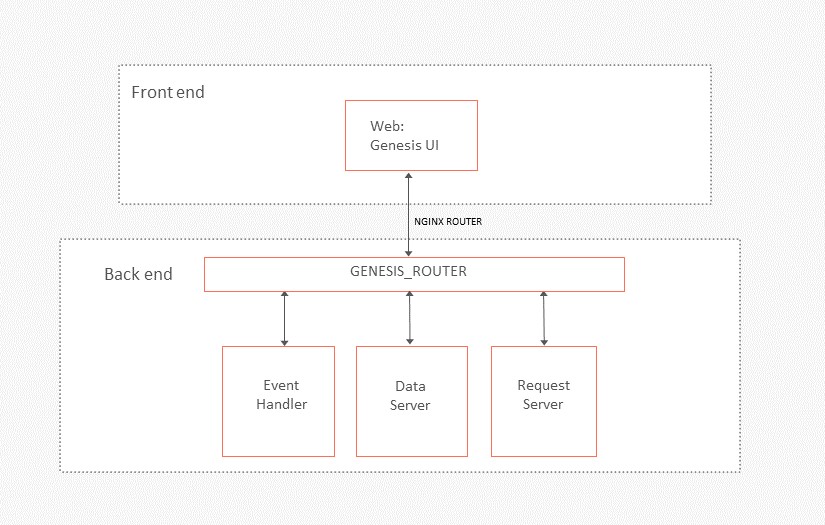
The GENESIS_ROUTER service on the server acts as the endpoint for all API calls and listens (by default) to port 9064. It proxies all requests to the relevant process based on the MESSAGE_TYPE
It can be configured genesis-router.kts, which overrides the default platform provided configuration file for an application. In your local project, place this file in your application's scripts folder (server/<app>-app/src/main/genesis/scripts/). On a deployed server, place it in site-specific/scripts, not in <app>/scripts.
Here is an example:
router {
    webPort = 9064
    socketPort = 9065
    pollingTimeout = 60
    authDisabled = false
    strictHttpStatusCode = false
    nettyLoggingEnabled = false

    httpServerCodec {
        maxInitialLineLength = 4096
        maxHeaderSize = 8192
        maxChunkSize = 8192
        validateHeaders = true
        initialBufferSize = 128
    }
    httpObjectAggregator {
        maxContentLength = 262144
        closeOnExpectationFailed = false
    }

    websocketServer {
        compression = false
        maxFrameSize = 262144
        maxAggregatedFrameSize = 2621440
    }

    routes {
        route(messageType = "ALL_ORDERS", process = "OEMS_DATASERVER")
        route(messageType = "ALL_TRADES", process = "OEMS_DATASERVER")
        route(messageType = "ALL_ORDER_AUDITS", process = "OEMS_DATASERVER")
    }

    allowList {
        entry("ALL_ORDERS")
        entry("ALL_TRADES")
        entry("ALL_ORDER_AUDITS")
    }

    cookieAuthentication {
        enabled = true
        httpOnly = true
        secure = false
        wrap = false
        path = "/"
        domain = null
        sameSite = SameSite.Lax
    }

    clientHandler {
        channelCapacity = 20
        onChannelFull = CLOSE
    }

    onHeartbeatPing {
        // do something on each Heartbeat ping received from a client.
    }
}
A change to genesis-router.kts takes effect only when the router restarts. Run killProcess GENESIS_ROUTER followed by startProcess GENESIS_ROUTER, or, in development, restart the application from Genesis Start (stop it, then start it).
A deployed router reads genesis-router.kts from genesis-home ($GENESIS_HOME/site-specific/scripts/ or $GENESIS_HOME/<product>/scripts/), not from src/main/genesis. Before you restart with killProcess and startProcess, run genesisInstall or edit the installed copy.
Under Genesis Start, the default profile is Dev Compact, which runs the router inside GENESIS_COMPACT_PROCESS. There is no GENESIS_ROUTER process in that case, so restart GENESIS_COMPACT_PROCESS instead: stop it, then start it from Genesis Start.
Router configuration
Let's have a look at the different options for configuring this file. You have seen some, but not all of these in the example above.
webPort This port is used for tcp/ip socket. You must declare a port, and it cannot be below 1024.
socketPort This port is used for http/websockets. You must declare a port, and it cannot be below 1024.
pollingTimeout This setting contains the timeout (in seconds) to expire inactive dataserver subscriptions. Subscription inactivity is determined by the lack of HTTP requests from the client targeting a specific Data Server subscription. Default value is 60 seconds.
authDisabled This is a dangerous setting! If set to true, it disables all authentication on the router. Typically, it is used for development mode. If you need to use this for another reason, see our section on non-authenticated Genesis Routers. Default value is false.
strictHttpStatusCode If set to true, this setting ensures all HTTP status codes found in error responses are applied to the HTTP reply. If set to false, a validation error in an event handler would return the error information payload in an HTTP 200 responses instead of an adequate HTTP error code. Default value is false.
nettyLoggingEnabled If set to true, this setting enables internal netty logging. Default value false.
httpCompression If set to true, adds an HttpContentCompressor to the Netty pipeline, so HTTP responses are gzip/deflate-compressed for clients that send an Accept-Encoding request header. Useful for large JSON responses from custom endpoints. Default value: false. (Available since 8.14.31.)
Netty configuration
httpServerCodecDefinition
This represents the configuration for the internal Netty HttpServerCodec used in the GENESIS_ROUTER service. it is a combination of a Netty HttpRequestDecoder and HttpResponseEncoder, which enables easier server-side HTTP implementation.
You can find more information in the netty documentation.
Relevant codec options are:
maxInitialLineLengthdefault value: 4096maxHeaderSizedefault value: 8192maxChunkSizedefault value: 8192validateHeadersdefault value:trueinitialBufferSizedefault value: 128
httpObjectAggregatorDefinition
A Netty ChannelHandler that aggregates an HttpMessage and its following HttpContents into a single FullHttpRequest or FullHttpResponse (depending on if it used to handle requests or responses) with no following HttpContents.
There is more information in the netty documentation.
maxContentLengthThe maximum length of the aggregated content in bytes. Default value: 262144closeOnExpectationFailedIf a 100-continue response is detected but the content length is too large, then true means close the connection. Otherwise, the connection will remain open and data will be consumed and discarded until the next request is received. Default value: false
websocketServer
This represents the internal configuration of the Netty websocket server and its handlers.
Relevant options are:
compression: Adds aWebSocketServerCompressionHandlerto the Netty pipeline if set totrue. Default value:false.maxFrameSize: Changes the default max size in bytes for each websocket frame. Default value: 262144maxAggregatedFrameSize: Changes the default max size in bytes for an aggregated websocket frame. Default value: 2621440
Message routes
routes You can redirect some microservice messages to particular processes by declaring new route blocks within this one.
route Is the defined route taking both a messageType and a specific process.
Blocked and allowed resources
You can control which resources are exposed to the front end by the Genesis Router using either allowList or blockList.
- If you specify one or more resources as
allowList, then only these resources (and the Genesis defaults) are accessible. - If you specify one or more resources as
blockList, then these resources are not exposed. All other resources (including the Genesis defaults) are accessible. - If you don't specify any resources as either
allowListorblockList, then all resources (including the Genesis defaults) are accessible.
The allowList and blockList tags are mutually exclusive. If you specify both, it will generate an error.
The default resources that are always exposed are:
- EVENT_LOGIN_AUTH
- EVENT_LOGOUT
- MORE_ROWS
- MORE_COLUMNS
- DATA_LOGOFF
- DATA_GET
entry Is the additional accepted messageType.
Cookie authentication
From GSF version 6.7 onwards, you can configure the HTTP authentication flow to use a cookie-based approach. When the cookie authentication mechanism is enabled:
- The Genesis Platform expects all login and logout events to be called via HTTP.
- Information related to the session itself (e.g. session id, session token, refresh token) is handled transparently using cookies.
Given these expectations, login and logout operations via Websocket are not allowed. A Websocket connection to GENESIS_ROUTER is only possible after a successful HTTP login.
The configuration options are:
enableddefines whether the cookie authentication mechanism will be enabled or disabled at the Router level. Default: true (since 8.14)httpOnlysets the generated cookies to be 'HttpOnly' (more information here). Default: true (since 8.14)securesets the generated cookies to be 'Secure' (more information here). Default: falsewrapwraps the value of the cookie itself in double quotes (i.e. ") Default: falsepathsets the specific path attributed to the cookie values. Default: "/"domainsets the expected domain for the generated cookie. Default: nullsameSiteconfigures the behaviour of the cookie when used as part of cross-site requests. Cookies with undefined (i.e. null)sameSiteconfiguration will default to SameSite.Lax . Available values: SameSite.None, SameSite.Lax, SameSite.Strict. Default: null (i.e. therefore SameSite.Lax)sessionCookiesWhentrue, the router sends auth cookies (session and refresh tokens) as session cookies withoutMax-Ageso they expire when the browser closes; whenfalse(default), cookies use their configured timeout values.
For more information about all the different cookie configuration options and the impact they have in terms of security, refer to the OWASP cookie testing guide.
Configuring client handling
For each client connection, the Router maintains its own message buffer (channel) for sending messages to a client. You can configure:
- the size of the channel buffer
- the behaviour if the buffer becomes full
To configure client handling, open a clientHandler block. There is an example of this in the main example at the top of the page. The configuration options are:
-
channelCapacitysets the size of the channel buffer. Defaults to 32. -
onChannelFullsets the behavior when the buffer is full:SUSPENDis the default behaviour. This utilises Kotlin coroutines and they will wait (suspend) for the buffer to have space before adding any further messages to the buffer.CLOSEcauses the client connection to be closed if the channel buffer becomes full. This could happen with slow consumers, and can help protect the ROUTER process rather than causing a large backlog of messages, which consumes memory. In the worst case, this could cause an Out Of Memory error on the ROUTER process.
onHeartbeatPing
If there is an onHeartbeatPing block defined in the -router.kts configuration, it will be called for every HEARTBEAT_PING message received from a client. The context properties available in the onHeartbeatPing are:
| Name | Type | Description |
|---|---|---|
| userName | String | The name of the user associated to the heartbeat message (if available) |
| authenticated | Boolean | Indicates if the user is authenticated |
| sessionAuthToken | String | Authentication token for the session |
| sessionId | String | Unique identifier for the session |
| heartbeatPing | GenesisSet | Raw heartbeat message payload in GenesisSet format |
| entityDb | AsyncMultiEntityReadWriteGenericSupport | Handles async read/write operations for entities (use with utmost restraint) |
Example code:
    val LOG = LoggerFactory.getLogger("OnHeartbeatPing")
    onHeartbeatPing {
        if (authenticated) {
            LOG.info("User {} is authenticated", userName)
        }
    }
Configuring runtime
There are two important files in your application that contain configuration information; make sure that your Genesis Router is configured correctly in both of them:
- application-name-processes.xml
- application-name-service-definitions.xml
Configuring in processes.xml
Here is an example of the Genesis Router's configuration in an application's processes.xml file:
<process name="GENESIS_ROUTER">
    <start>true</start>
    <scheduleRestart>true</scheduleRestart>
    <groupId>GENESIS</groupId>
    <options>-Xmx512m -DXSD_VALIDATE=false</options>
    <module>router</module>
    <package>global.genesis.router,global.genesis.console</package>
    <config>router-process-config.kts</config>
    <script>genesis-router.kts</script>
    <language>pal</language>
    <classpath>genesis-console-*.jar</classpath>
    <description>Socket, Websocket and HTTP proxy which routes incoming messages to GENESIS microservices</description>
</process>
For more information on the tags that can be set within the configuration for your application in this file, go to our page on processes.xml.
Configuring in service-definitions.xml
The service definition is designed to make sure that each module (service) has a unique port number for inter-process messaging. Here is an example:
<service host="localhost" name="GENESIS_ROUTER" port="9017"/>
For more information on the attributes that can be set here, go to our page on service definitions.
Metadata requests
Genesis Router answers three requests that describe your application's resources rather than use them. To get the shape of a resource, use JSON_SCHEMA_REQUEST.
| Request | MESSAGE_TYPE | HTTP path | What it returns |
|---|---|---|---|
| Resources | RESOURCES_REQUEST | GET /resources-request | Every resource the router can reach, with its type |
| JSON schema | JSON_SCHEMA_REQUEST | POST /json-schema-request | The inbound and outbound JSON schemas of one resource |
| Metadata (legacy) | META_REQUEST | GET /meta-request | The fields of one resource, in the older metadata format |
To get a full Open API specification instead, use the /gwf/open-api/spec/ endpoint described on the Open API page. It is built from the same JSON schemas.
Sending a metadata request
Over HTTP, the path is the message type written in lower case with hyphens: JSON_SCHEMA_REQUEST becomes /json-schema-request. For a POST request, the router takes the MESSAGE_TYPE from the path and reads only the DETAILS block of the body. You don't need to put MESSAGE_TYPE or SOURCE_REF in the body.
All three requests need a logged-in user. Set these headers:
SESSION_AUTH_TOKENis the token returned when the user logs in. The router rejects requests without a valid token.SOURCE_REFis optional. The router uses it to match the reply to the request, and generates one if you leave it out.USER_NAMEis only used when the router runs withauthDisabled = true. In that case, the router takes the user name from this header and does not needSESSION_AUTH_TOKEN.
If a proxy strips headers that contain underscores, you can send SESSION-AUTH-TOKEN, SOURCE-REF and USER-NAME instead.
If the token is missing or invalid, the router replies with a MSG_NACK and HTTP status 401. When no token is sent, the error text is "This request needs the user to be logged in, but the current authentication status is logged out". When the token is invalid, it is "User is not logged in and supplied auth token is invalid.":
{
  "MESSAGE_TYPE": "MSG_NACK",
  "SOURCE_REF": "...",
  "ERROR": [
    { "CODE": 401, "TEXT": "User is not logged in and supplied auth token is invalid.", "STATUS_CODE": "401 Unauthorized" }
  ],
  "DETAILS": {
    "ERROR": "User is not logged in and supplied auth token is invalid.",
    "STATUS_CODE": "401 Unauthorized"
  }
}
Choosing the FEATURE
Metadata and JSON schema requests name one resource in DETAILS.FEATURE. The router sends the request to the process that owns that resource, and that process sends the reply. FEATURE must be the resource's exact name:
- for an Event Handler, the event name with its
EVENT_prefix, for exampleEVENT_TRADE_INSERT - for a Request Server, the name of the
requestReplywithout theREQ_prefix, for exampleTRADE_DETAILS - for a Data Server, the name of the query, for example
ALL_TRADES
FEATURE does not accept wildcards: a name containing one is treated as an unknown resource and gets the same 404 MSG_NACK. To find the names you can use, send a resources request first.
If FEATURE is missing, or names a resource that no process has registered, the router cannot work out where to send the request. It replies with a MSG_NACK and HTTP status 404:
{
  "MESSAGE_TYPE": "MSG_NACK",
  "SOURCE_REF": "...",
  "ERROR": [
    { "CODE": 404, "TEXT": "Resource EVENT_UNKNOWN is not mapped to a service", "STATUS_CODE": "404 Not Found" }
  ],
  "DETAILS": {
    "ERROR": "Resource EVENT_UNKNOWN is not mapped to a service",
    "STATUS_CODE": "404 Not Found"
  }
}
Every MSG_NACK from the router also carries a DETAILS block with ERROR and STATUS_CODE, which repeats the first entry in ERROR.
If FEATURE is missing altogether, the resource name in the text is empty, so the text reads Resource is not mapped to a service (with two spaces).
The allowList and blockList settings apply to the FEATURE value. If a resource is blocked, the router does not return its metadata or JSON schema either.
Listing resources
GET http://localhost:9064/resources-request
SESSION_AUTH_TOKEN: <session-auth-token>
The reply lists each resource by name and type:
{
  "MESSAGE_TYPE": "RESOURCES_REQUEST_ACK",
  "SOURCE_REF": "...",
  "RESOURCES": [
    { "RESOURCE_NAME": "EVENT_TRADE_INSERT", "RESOURCE_TYPE": "EVENT_HANDLER" },
    { "RESOURCE_NAME": "ALL_TRADES", "RESOURCE_TYPE": "DATASERVER" }
  ]
}
Getting a resource's JSON schema
POST http://localhost:9064/json-schema-request
Content-Type: application/json
SOURCE_REF: <source-ref>
SESSION_AUTH_TOKEN: <session-auth-token>

{
  "DETAILS": {
    "FEATURE": "EVENT_TRADE_INSERT"
  }
}
If the resource has a JSON schema, the reply is a JSON_SCHEMA_FEATURE_ACK. INBOUND holds the schema of the message the resource accepts, and OUTBOUND holds the schema of the reply it sends:
{
  "MESSAGE_TYPE": "JSON_SCHEMA_FEATURE_ACK",
  "SOURCE_REF": "<source-ref>",
  "INBOUND": { ... },
  "OUTBOUND": { ... }
}
GPAL Event Handlers, Request Servers and Data Server queries all publish JSON schemas. If a resource is registered but has no JSON schema, the reply is a JSON_SCHEMA_NACK with a FEATURE_NOT_FOUND error.
META_REQUEST is the older metadata format. It is legacy and discouraged for new clients, but Genesis UI components still send it (for example foundation-ui's getMetadata), so the router still supports it. Send it as a GET and pass the resource in the query string, for example GET /meta-request?DETAILS[FEATURE]=<resource>.
Custom endpoints
To create a custom endpoint using the Genesis Router, simply implement the WebEndpoint interface provided by Genesis Router. Call upon the registerEndpoint method of an injected WebEndpointRegistry object.
In the following examples, a FileEndpointCommon class has also been created to hold utility methods that may be needed across multiple endpoints:
FileEndpointCommon
- Kotlin
- Java
public class FileEndpointCommon {
    companion object {
        const val ENDPOINT_NAME = "file-handler"
   }
}
public class FileEndpointCommon {
    static final String ENDPOINT_NAME = "file-handler";
}
FileProcessor
- Kotlin
- Java
@Module
class FileProcessorKotlin @Inject constructor(
    private val registry: WebEndpointRegistry
) : WebEndpoint {
    @PostConstruct
    fun init() {
        registry.registerEndpoint(FileEndpointCommon.ENDPOINT_NAME, this)
    }

    override fun allowedMethods(): Set<RequestType> {
        return ALLOWED_HTTP_METHODS
    }

    override fun name(): String {
        return "upload"
    }

    override fun process(s: String, fullHttpRequest: FullHttpRequest, channel: Channel): Any {
        LOG.debug("Hit {}/{} endpoint", FileEndpointCommon.ENDPOINT_NAME, name())
        //This is where you would make calls to other services and libraries with the newly uploaded file.
        val responseJson = "{ \"Result\": \"Successful upload\"}".toByteArray(StandardCharsets.UTF_8)
        val responseBuffer = Unpooled.wrappedBuffer(responseJson)
        val response = DefaultFullHttpResponse(
            HttpVersion.HTTP_1_1,
            HttpResponseStatus.OK,
            responseBuffer
        )
        response.headers().add(HttpHeaderNames.CONTENT_TYPE, HttpHeaderValues.APPLICATION_JSON)
        HttpUtil.setContentLength(response, responseJson.size.toLong())
        return response
    }

    override fun requiresAuth(): Boolean {
        return if (System.getProperty("TEST_MODE") != null) {
            false
        } else {
            super.requiresAuth()
        }
    }

    companion object {
        private val LOG = LoggerFactory.getLogger(FileProcessorKotlin::class.java)
        private val ALLOWED_HTTP_METHODS: Set<RequestType> = ImmutableSet.of(RequestType.POST)
    }
}
@Module
public class FileProcessor implements WebEndpoint {

    private static final Logger LOG = LoggerFactory.getLogger(FileProcessor.class);
    private static final Set<RequestType> ALLOWED_HTTP_METHODS = ImmutableSet.of(RequestType.POST);

    private final WebEndpointRegistry registry;

    @Inject
    public FileProcessor(WebEndpointRegistry registry) {
        this.registry = registry;
    }

    @PostConstruct
    public void init() {
        this.registry.registerEndpoint(FileEndpointCommon.ENDPOINT_NAME, this);
    }

    @NotNull
    @Override
    public Set<RequestType> allowedMethods() {
        return ALLOWED_HTTP_METHODS;
    }

    @NotNull
    @Override
    public String name() {
        return "upload";
    }

    @NotNull
    @Override
    public Object process(@NotNull String s, @NotNull FullHttpRequest fullHttpRequest, @NotNull Channel channel) {
        final byte[] responseJson = "{ \"Result\": \"Successful upload\"}".getBytes(StandardCharsets.UTF_8);
        //This is where you would make calls to other services and libraries with the newly uploaded file.
        final ByteBuf responseBuffer = Unpooled.wrappedBuffer(responseJson);
        final DefaultFullHttpResponse response = new DefaultFullHttpResponse(
                HttpVersion.HTTP_1_1,
                HttpResponseStatus.OK,
                responseBuffer
        );
        response.headers().add(HttpHeaderNames.CONTENT_TYPE, HttpHeaderValues.APPLICATION_JSON);
        HttpUtil.setContentLength(response, responseJson.length);
        return response;
    }

    @Override
    public boolean requiresAuth() {
        if(System.getProperty("TEST_MODE") != null){
            return false;
        } else {
            return WebEndpoint.super.requiresAuth();
        }
    }

}
Non-authenticated routers
As we have noted, the authDisabled setting is dangerous. One way or another, it is essential that you make your Genesis Router secure. If you want to disable authentication for any other reason than local testing (for example, heavy interaction with legacy systems that can be secured at a legacy level), you still need to take the greatest care to ensure security:
- Use unique ports, and make sure there is no clash with other modules. By default, Genesis Router uses 9064/9065. Make sure this is correctly entered in your application-service-definitions.xml file.
- Make sure that the firewall settings for these ports are limited, so that unwanted external traffic cannot reach it.
- It is useful to rename your Genesis Router's genesis-router.kts file to genesis-router-no-auth.kts. In this file, you must list the event/dataserver/reqrep resource names in an
allowListblock (one entry per item) to specify the resources that can be hit. These are the only resources that can be hit. This is critical to ensuring security.
Once you have defined a non-authenticated Genesis Router and arranged its security, you need to make sure it has a correct entry in your application-processes file; this must point at your .kts file. For best practice, clearly name the process as non-authenticated. For example:
<process name="GENESIS_ROUTER_NO_AUTH">
    <start>true</start>
    <groupId>GENESIS</groupId>
    <opKons>-Xmx512m -DXSD_VALIDATE=false</opKons>
    <module>router</module>
    <package>global.genesis.router </package>
    <config>genesis-router-no-auth.kts</config>
    <classpath>genesis-console-4*.jar,ppt-pdjandler-*.jar</classpath>
    <descripKon>Socket, Websocket and HTTP proxy which routes incoming messages to GENESIS
microservices</descripKon>
</process>
Testing the Genesis Router
To create unit tests for Genesis Router, you can extend the AbstractGenesisTestSupport class and specify the genesis-router.kts as the Script file name. Examples of how you would initialise a test extending this class are provided below.
More information about how testing works is in our section on Integration testing.
- Kotlin
- Java
class TestEndpoint : AbstractGenesisTestSupport<GenesisSet>(
    GenesisTestConfig {
        packageNames = mutableListOf("global.genesis.router", "org.file.processor")
        genesisHome = "/genesisHome"
        scriptFileName = "genesis-router.kts"
        parser = { it }
    }
) {
    override fun createDictionary(): GenesisDictionary = testDictionary()}

    @Test
    fun testRouterEndPoint() {
        val client = HttpClient.newHttpClient()
        val request = HttpRequest
            .newBuilder(URI("http://localhost:9064/file-handler/upload"))
            .version(HttpClient.Version.HTTP_1_1)
            .POST(HttpRequest.BodyPublishers.ofString("TEXT"))
            .build()
        val response = client.send(request, HttpResponse.BodyHandlers.ofString())
        Assert.assertEquals("{ \"Result\": \"Successful upload\"}", response.body())
    }
public class TestEndpoint extends AbstractGenesisTestSupport<GenesisSet> {
    public TestEndpoint () {
        super(GenesisTestConfig.builder()
            .setPackageNames(List.of("global.genesis.router", "org.file.processor"))
            .setGenesisHome("/genesisHome")
            .setScriptFileName("genesis-router.kts")
            .setParser(e -> e)
            .build());
    }

    @Test
    public void testRouterEndpoint() throws URISyntaxException, IOException, InterruptedException {
        var client = HttpClient.newHttpClient();
        var request = HttpRequest
                .newBuilder(new URI("http://localhost:9064/file-handler/upload"))
                .version(HttpClient.Version.HTTP_1_1)
                .POST(HttpRequest.BodyPublishers.ofString("TEXT"))
                .build();

        var response = client.send(request, HttpResponse.BodyHandlers.ofString());
        assertEquals("{ \"Result\": \"Successful upload\"}", response.body());
    }
}
Metrics
Ensure you have enabled metrics in your environment to view them.
The metrics for Genesis Router measure the number of connections and the processing latency.
| Metric | Explanation |
|---|---|
| active_connections | The number of client connections |
| message_processing_latency | The latency for processing messages |